
Standing Desk Wobble on Carpet: Setup Checks
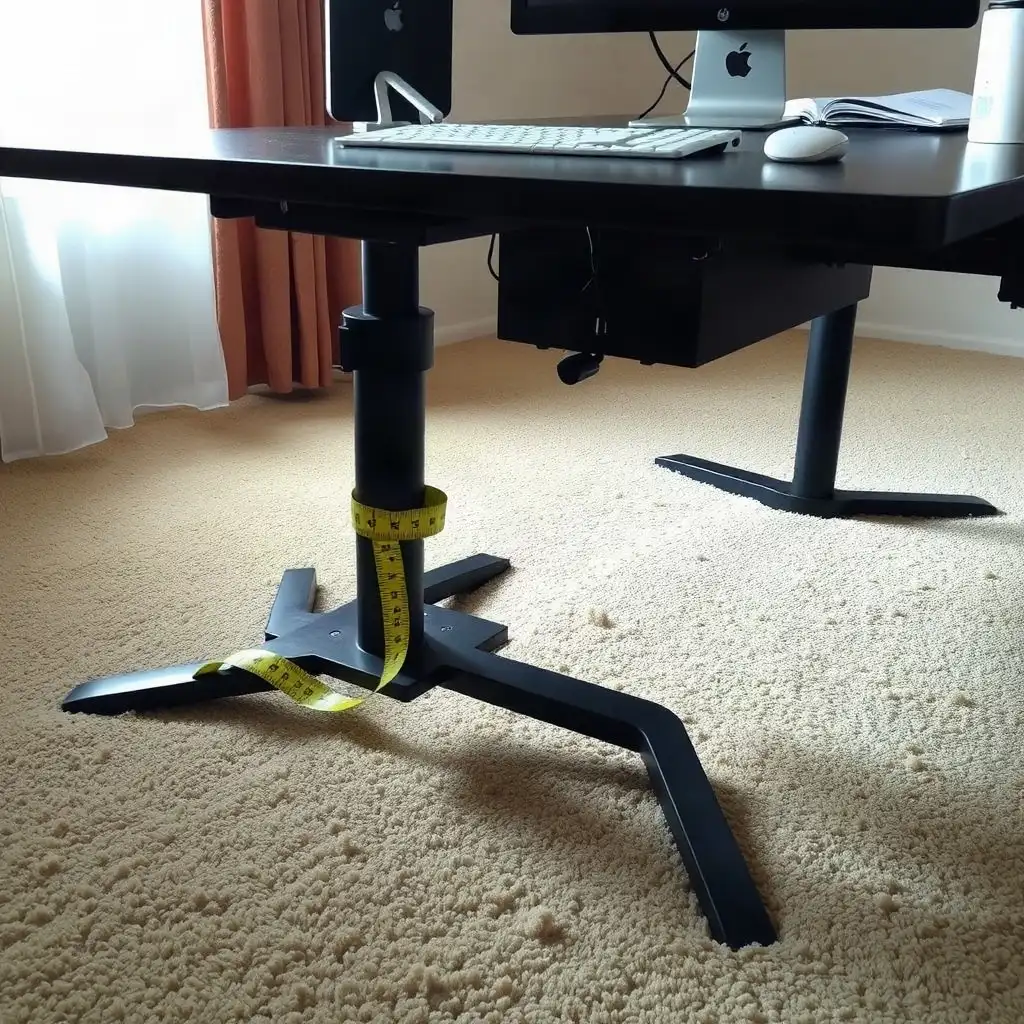
A stable standing desk is crucial for work, especially on carpet. Each leg must be in contact with the floor; if one leg sinks, adjustments are needed. Use leveling feet or coasters and place heavier items toward the back to reduce wobbliness. Keeping cables organized creates a neat workspace and reduces stability risks when adjusting height. Regularly checking these factors ensures a comfortable setup that supports productivity.
Assessing Desk Stability on Carpet
A detailed look at desk stability starts with checking the contact points between the desk and the carpet. If the surfaces aren’t even, you may notice unexpected movement. Ensure all legs are securely on a stable part of the floor. If any leg is sinking or wobbling due to soft carpet fibers, adjusting them individually may help; consider using furniture sliders for extra support. Assess frame stability at both sitting and standing heights, especially after changing the load or floor contact.
Weight Distribution
How you spread weight across your desktop can significantly affect stability. A balanced setup reduces stress on any single point, preventing wobble while you work. Keep frequently used items closer and place heavier objects toward the back or sides, this improves balance and supports better ergonomics as you work at different heights throughout the day. Add the desk, monitor arms, and other equipment, then compare their combined weight with the specified weight limit.
Checking Floor Contact Points
A close look at where your standing desk touches the carpet is essential for stability. Each leg must sit firmly on a level surface to avoid rocking or shifting during use. If any legs aren’t fully touching the ground due to thick carpeting, adjustments are necessary. Use leveling feet if available, as they can be adjusted for carpet thickness. If your desk lacks adjustable feet, furniture coasters can provide a solid base and help distribute weight evenly. With an L-shaped desk, check load distribution and floor support across the return-surface layout.
Desk Arrangement Matters
Also, consider how you arrange items on your desk; this affects stability while working. An uneven setup can create pressure points that lead to wobbliness. To maintain stability, place lighter items within easy reach and heavier equipment in the back corners; this lowers the center of gravity and reduces movement when switching between sitting and standing throughout your workday.
The Pros & Cons of Desk Stability on Carpet
Pros
-
A standing desk on carpet helps you switch between sitting and standing, promoting better posture.
-
Checking the setup can improve stability and minimize wobbling while in use.
-
Making leveling adjustments can create a steadier work surface if your carpet is uneven.
-
Watching how the desk performs at different heights can give you insights into its stability across various settings.
-
Assembling the desk correctly and attaching any accessories properly adds to its overall stability.
Cons
-
Carpet compression can cause the desk's feet to lose even contact, leading to instability.
-
Not every desk comes with manufacturer-approved leveling adjustments, which limits your correction options.
-
When you raise the desk, movement might feel more noticeable, impacting your comfort and productivity.
-
Cords or attachments that get caught during height adjustments can disrupt smooth operation and stability.
-
If there's a consistent wobble after you've set everything up correctly, you may need to reach out to the manufacturer for help.
Leveling Your Standing Desk
Ensuring your standing desk is leveled correctly is key for stability, especially on carpeted floors. Use a level tool to check if the desktop sits horizontally when adjusted to different heights. If it tilts or wobbles, make adjustments. Many desks include leveling feet designed for this; these accommodate various carpet thicknesses and provide a stable base. If your desk lacks adjustable features, place small shims under any uneven leg, this simple fix can improve stability.
Weight Distribution
Besides leveling the legs, examine how weight is distributed across your workspace since this affects overall steadiness. A top-heavy setup can increase wobbling; thus, balancing items is crucial as you work at different heights. Placing heavier items towards the back helps reduce forward tilt and strengthens support as you switch from sitting to standing. Securing cables and accessories minimizes movement by preventing snagging or pulling that could unbalance your desk, small tweaks can lead to significant improvements in creating an ergonomic workspace.
Reviewing Desk Setup Factors
The effectiveness of using a standing desk on carpet depends on leveling and workspace organization. Regularly check your setup to ensure heavier items, like monitors or printers, are in the back corners instead of at the front edge. This arrangement lowers the center of gravity and improves stability when adjusting desk height. Keep frequently used items within easy reach to prevent unnecessary movements that could disrupt balance.
Cable Management
A key part of maintaining stability is keeping all accessories and cables organized along specific paths or under cable management systems. Loose cords can get caught during adjustments, causing unwanted movement and interrupting workflow. By securing everything neatly with clips or ties, you reduce potential hazards linked to instability.
Manufacturer Recommendations
Consider manufacturer guidelines regarding load capacities and configurations when setting up your desk. Each model may have different requirements based on its design; consulting manuals ensures you follow recommendations tailored for optimal performance in various settings, including plush carpeting, which can create challenges if overlooked. Keeping these factors in mind helps create a productive environment while minimizing issues from wobbling during use.
Stability Secrets: Perfecting Your Desk Setup
| Setup Check | Description | Importance | Practical Steps | Manufacturer Notes |
|---|---|---|---|---|
| Floor Contact | Ensure the desk legs are in full contact with the carpet to prevent instability. | Stability | Check for any uneven surfaces or gaps. | Varies by model; refer to manuals. |
| Leveling | Verify that the desk is level to avoid wobbling when in use. | User comfort | Use a level tool on the desktop surface. | Consult specific desk instructions. |
| Load Distribution | Distribute weight evenly across the desktop to minimize tipping or swaying. | Balance | Adjust items on the desk as needed. | Check load capacity in user manual. |
| Carpet Thickness | Consider the thickness of the carpet, which can affect desk stability. | Support | Check that every foot rests evenly; use only leveling adjustments permitted by the desk manual. | Manufacturer guidelines may vary. |
| Desk Footprint | Ensure the desk’s footprint matches the available space and does not create a tipping risk. | Safety | Confirm dimensions against floor layout. | Refer to desk specifications. |
| Monitor Arm Positioning | Position monitor arms to prevent added leverage that could cause wobble. | Reduces strain | Adjust arm placements and check for balance. | Follow manufacturer’s setup guides. |
| Cable Management | Organize cables to avoid snagging or pulling on the desk, which can lead to instability. | Functionality | Use clips or ties to secure cables. | Check for compatibility with desk features. |
| Regular Maintenance | Perform periodic checks to ensure all parts remain tight and functional. | Longevity | Tighten screws and inspect joints regularly. | Refer to maintenance section in manuals. |
Evaluating Footprint and Base Width
The footprint and base width of a standing desk affect its stability, especially on carpet. A wider base spreads weight evenly, reducing the likelihood of tipping or wobbling. Users should compare their desk’s dimensions to the surrounding space; if the feet extend beyond thick carpet, balance improves. For desks with narrower bases, consider stabilizing accessories like anti-slip mats for carpets to enhance grip and reduce movement.
Understanding Footprint Dimensions
An appropriate footprint involves both width and depth. A top-heavy desk without adequate support may sway when users change positions or lean forward while typing. Ensuring all legs consistently touch the floor is essential. If carpeting causes unevenness, consider using adjustable feet.
Importance of Regular Checks
Minor adjustments can significantly impact stability and comfort during work sessions at varying heights. Regularly checking these factors helps create an optimized workspace free from distracting movements caused by instability on carpeted surfaces, maintaining productivity and well-being throughout the day.
Securing Cables and Accessories
Cables and accessories often get overlooked in the stability of standing desks, but they are significant. Loose cables can create tension during height adjustments, leading to unwanted movement or tipping. Users should ensure all cords are securely fastened along designated paths. Using clips or ties keeps them organized and reduces hazards from snagging.
Cable Management Solutions
Consider using cable management solutions designed for desks; these systems prevent mobility issues while allowing easy access to necessary equipment.
To securing cables, check how accessories like monitor arms or extra screens are mounted on the desk. If items aren’t secured properly, they can add leverage that worsens wobbling, especially if they hang over the edge without support. For heavier monitors or devices, follow manufacturer guidelines for secure attachment to keep weight balanced during height adjustments.
Regular Setup Reassessments
regularly reassess your setup as you add new items over time. Keeping everything anchored properly gives better control and reduces instability caused by shifting components in your workspace. By managing both cables and accessories effectively, individuals create a more stable working experience on carpeted surfaces, a small change that boosts productivity overall.
Unraveling Myths of Standing Desk Stability
-
Standing desks can feel wobbly on carpet due to uneven contact and movement when weight is applied.
-
The carpet's pile and padding might compress under a desk, affecting stability. Adjustments depend on your flooring and desk design.
-
A desk that appears level at one height may be less stable when raised, so check stability at all heights you use.
-
Cords and attachments must move freely as you adjust the desk's height; if they snag, it could affect performance and stability.
-
If wobbling continues after checking foot contact, making approved leveling adjustments, and verifying assembly, contact the manufacturer for assistance instead of attempting structural or electrical fixes.
Testing for Movement During Use
Testing the stability of a standing desk while in use is crucial for anyone facing wobble on carpet. Start with basic movement tests to observe how your desk behaves during adjustments or when pressure is applied. A useful method is to gently push down on the desktop from different angles to identify any noticeable rocking or instability as weight shifts. If the desk feels unsteady, check its leveling and load distribution; these factors often impact performance.
Manufacturer Recommendations
reviewing specific manufacturer recommendations about height adjustment mechanics provides insight into potential stability issues. Different models have unique features like motor count and load capacity limits that influence their performance under varying weights or conditions. Checking user manuals ensures your setup aligns with intended configurations for optimal function, regardless of carpet thickness.
Maintenance Checks
Regularly inspecting adjustable components for wear or misalignments protects against unexpected movements. This proactive approach creates a more reliable workspace over time.
Addressing Common Manufacturer Limits
Manufacturer specifications play a key role in understanding the stability of standing desks on carpet. These details include weight capacities, motor setups, and height adjustment features, all affecting desk performance. Users should check their model’s manual for guidelines on recommended load distributions; ignoring these may lead to instability. Some manufacturers also warn against using specific accessories or extra equipment, overloading could weaken structure and performance.
Adjustments
adjustments aren’t one-size-fits-all; users need to consider the unique traits of their workspace when following manufacturer recommendations. Those with thick carpets might find it helpful to use stabilizing options like specialized mats or leveling feet designed for uneven surfaces. This customized approach ensures that every detail, from managing loads to considering environmental factors, is taken into account.
User Feedback
Incorporating feedback from other users who have faced similar challenges can provide useful insights as well. Getting involved in communities focused on ergonomic setups allows individuals to share experiences and practical tips related to common design limitations found in different models, this shared knowledge improves effectiveness while reducing wobble experienced by many working at various heights throughout the day.
Ensuring Stability on Carpet
To keep your standing desk stable on carpet, ensure each leg is firmly in contact with the floor. If any legs are not touching due to plush carpeting, make adjustments. Use leveling feet or strong coasters for support where needed. Arrange items on your desktop by placing heavier objects at the back and lighter ones at the front to promote balance and reduce strain when adjusting height.
Cable Management
Another important aspect is securing cables and accessories for better organization; loose cords can create instability as they move during use. Use cable management solutions like clips or ties to keep your workspace tidy and reduce hazards from snagging or pulling while adjusting heights. Regularly check these components to maintain an ergonomic environment tailored for working effectively on carpeted surfaces.
Manufacturer Recommendations
some desks come with specific manufacturer recommendations regarding load distribution, a quick look at user manuals can provide insights into weight limits and assembly instructions for different setups. Paying attention to these details creates a stable work area that supports productivity while addressing common issues faced by those setting up their standing desks on soft flooring.
FAQ
What should individuals check to ensure their standing desk feet are making proper contact with the carpet?
Ensure each foot of your standing desk evenly touches the carpet and that the base is stable when pressure is applied.
How do users adjust the leveling feet on their standing desks according to the manufacturer's instructions?
Users can adjust the leveling feet on their standing desks following the manufacturer’s manual, making small adjustments for even contact with the floor.
What observations can help determine if a standing desk feels unstable at different heights?
Check for wobbliness at different heights by observing movement during adjustments and ensuring all feet remain in contact with the floor.
What steps should be taken if a wobble persists after checking setup factors and adjustments?
If you notice a wobble after adjustments, contact the manufacturer or a qualified service provider for model-specific advice.