
How to Route Cables on a Moving Standing Desk
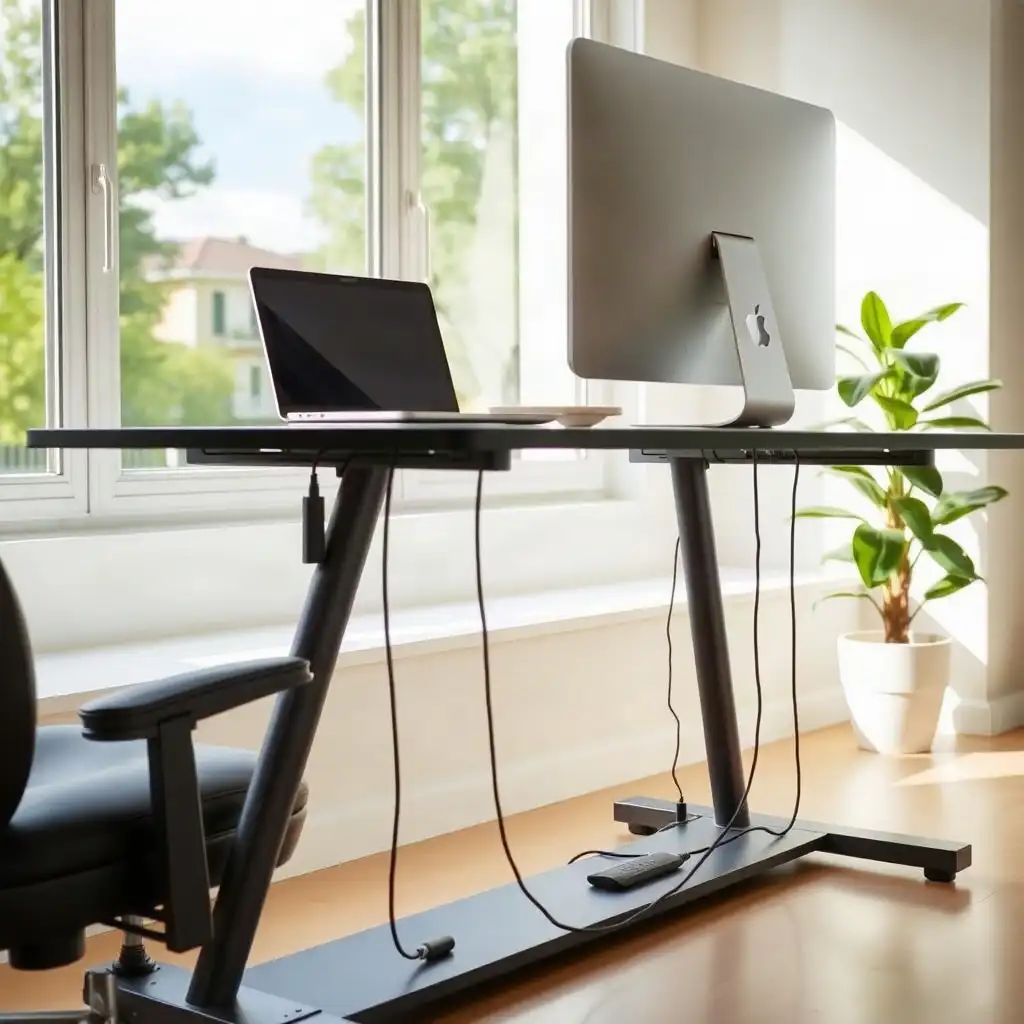
Managing cables on a standing desk is important for maintaining a functional workspace. As the desk height changes, cords can get tight or caught, causing damage over time. Check the lengths of your cables to ensure enough slack for smooth adjustments. Use adjustable clips along the legs of the desk to hold cables at different heights; this reduces strain on lighter data cables and positions heavier power adapters closer to the floor. Regularly check after changing the height to keep things organized and prevent tangles, creating an efficient workspace that boosts productivity.
Identifying Issues with Standing Desks
A common issue with standing desks is managing device cables. When adjusting the desk height, cords can become tight or caught, leading to potential damage. Without a plan, tangled wires can create a messy workspace.
First, determine how many cables you’re using and their lengths; this helps establish necessary slack for movement without clutter under the desktop. Watch for areas where cable interference may occur during adjustments, like near monitor arms or keyboard trays that could add weight and tension on cords.
Check for manufacturer-specific limits on cord length to avoid overstretching when changing heights; each model has different design features affecting optimal cable routing strategies in the setup process.
Strategizing Before Installation
Before starting the installation, plan your cable management. Visualizing the organization makes the process smoother and helps avoid problems later. Sort your cables into categories: power cords, data cables, and peripherals each have different routing needs. Identify which devices you use daily and their distance from outlets or hubs; this reduces excess length and boosts efficiency.
Consider height adjustments when securing cables. Look for adjustable anchoring solutions that offer flexibility without sacrificing organization during movement. Using Velcro ties provides adaptable hold that prevents kinks or strain on wires as you raise or lower the desk. This preparation ensures smooth transitions between sitting and standing positions without risking damage to your equipment due to tension build-up from poorly arranged cabling systems.
The Pros & Cons of Cable Routing Strategies
Pros
-
Proper cable routing keeps you safe by stopping cables from getting caught or pinched when you move your desk.
-
It helps create a neat workspace, making it look better and cutting down on clutter.
-
Having enough slack in the cables lets you adjust the height smoothly without harming connectors or ports.
-
Clear paths help prevent any interference with equipment movement, keeping everything functional.
-
Routing cables away from pinch points lowers the chances of wear and tear over time.
-
Effective routing ensures legroom stays clear, following ergonomic guidelines for your comfort.
Cons
-
Managing complex cables can take up a lot of time and might need regular adjustments.
-
If cables are routed incorrectly, they can get tangled, which creates safety risks in the workspace.
-
Too much slack in the cables can cause them to droop or loop, raising the chances of catching on moving parts.
-
Having limited access to power outlets makes it harder to set up effective cable routing strategies.
-
Equipment placed on the desk may complicate cable management because you have to consider extra movement.
-
It’s important to follow guidelines from manufacturers since these can differ between various desk models.
Essential Tools for Efficient Routing
Having the right tools makes it easier to manage cables for your standing desk. Start with cable cutters and scissors to trim excess lengths, ensuring everything looks neat without jagged edges. A label maker is useful; labeling each cable saves time when troubleshooting or rearranging. Consider zip ties and Velcro straps for bundling cords while allowing easy adjustments as you change heights.
Adhesive Clips or Mounts
Don’t forget the importance of adhesive clips or mounts for cord management. These small tools stick to surfaces around your workspace, keeping cables secure without damage. Having a measuring tape handy helps accurately gauge distances between devices and outlets, preventing kinks when adjusting heights throughout your workday. Consider using protective sleeves or tubing; they provide extra protection against wear while maintaining a tidy look across visible wires that pets might reach or feet could trip over under desks. Before mounting an arm or tray, check accessory clamp compatibility against both the accessory and desk instructions.
Ensuring Smooth Transitions During Height Changes
As you adjust your standing desk, keeping cables organized is important for smooth operation. Check the lengths of your cables before setting up. Leave some slack in each cord so they can move freely with height adjustments without being pulled or stretched. This helps avoid wear and tear over time, especially if using monitor arms or attachments that stress those cords.
Secure Cables at Different Heights
Another strategy is to attach cables along the legs of your desk at various heights. Use adjustable clips or mounts designed for this purpose; these keep cables tidy while allowing vertical movement when changing the desk’s height. Place heavier power adapters closer to the floor where they’re less affected by movement, reducing strain on lighter data cables above them. Make it a habit to check your setup after significant height changes; this ensures everything stays neat and functional without tangles during regular use.
Mastering Cable Management for Dynamic Workspaces
| Cable Routing Consideration | Description |
|---|---|
| Movement Clearance | Ensure cables have enough slack to avoid tension when the desk transitions between heights. |
| Cable Management Solutions | Utilize built-in cable management features or accessories designed for standing desks. |
| Monitor Arm Compatibility | Check that monitor arms do not interfere with cable routing and allow for smooth height adjustments. |
| Desk Type Distinction | Differentiate between motorized and hand-operated height adjustments for appropriate cable routing strategies. |
| Manufacturer Guidelines | Refer to specific desk manuals for details on load limits, mounting compatibility, and reset procedures. |
| Avoiding Snagging | Route cables in a way that prevents them from snagging or pinching during desk movement. |
| Leg Space Maintenance | Arrange cables to keep leg space clear, following ergonomic guidelines for comfortable reach. |
| Accessory Load Consideration | Be aware that added accessories like monitor arms increase load and require careful cable placement. |
| Practical Checks | Regularly inspect cable routing for wear and ensure optimal function as the desk is adjusted. |
Verifying Space and Flexibility
To make the most of your standing desk, ensure you have enough space and flexibility for managing cables. Start by examining your workspace layout. Check where each device connects, like power sources, monitors, and other peripherals, and ensure there’s enough room under the desktop for cables to move freely when you adjust the height. Measure distances between outlets and devices; this helps avoid issues later due to insufficient slack or sharp bends in cords.
Consider how different components work together as they change position. If you’re using a monitor arm or storage solutions under the desk, verify that these won’t interfere with cable paths when switching from sitting to standing positions. It’s essential to keep everything functional while preventing wear on cables that are constantly moving.
Be aware of any specific rules set by manufacturers regarding cord lengths and routing options based on design features unique to your model. Understanding these limits early on, like load capacities for mounted equipment, helps you decide how best to secure those connections without risking performance later. Regularly check this setup after making significant changes; staying proactive ensures organization and accessibility remain top-notch during daily use.
Maintaining a Tidy Workspace
Organizing your workspace improves efficiency and reduces distractions. A clean setup creates a welcoming atmosphere, so it’s essential to maintain tidiness. Regularly check for loose cables or messes around your desk. This step helps control disorder and allows focus on tasks.
Consider using tools to aid organization during maintenance checks. Cable sleeves bundle cords into one neat package, reducing tangling and improving appearance. Ensure all items that usually sit on or near the desk, like chargers or notebooks, are stored in their designated spots instead of scattered. This habit reduces visual clutter and fosters a calm environment conducive to creativity.
As you switch between sitting and standing throughout the day, check how well the cables stay organized during these movements. Tighten slack when necessary and reposition clips if things become untidy after changing positions; this ensures smooth functionality without compromising style or ease when adjusting heights.
Creative Cable Routing Myths and Facts Unveiled
-
Many people think that once cables are organized neatly at a standing desk, they will stay tidy when the desk moves. What looks organized when the desk is still can turn messy as it changes height.
-
It’s often assumed that all standing desks work similarly and have the same requirements. In reality, motorized desks use an electric control system while hand-operated ones rely on a manual mechanism, affecting cable routing differently.
-
Some believe leaving extra slack in cables helps with desk movement. But too much slack can cause cables to sag or get caught during height adjustments.
-
A common misunderstanding is that using ties or holders to secure cables means they won’t get stuck or pinched. If not secured properly, cables can still end up trapped in moving parts; ensuring a clear route for them throughout the desk's movement is important.
-
Many users may not realize how equipment attached to the desktop, like monitor arms, affects cable routing. These accessories change how wires move and require careful planning of their range of motion with any changes in desk height.
Eco-friendly Practices to Consider
When considering eco-friendly practices in your workspace, evaluate the materials and equipment you use. Choose cables made from recycled or sustainable materials to reduce environmental impact and support sustainable brands. Also, opt for energy-efficient devices; they consume less power and contribute to a greener office. Research manufacturers committed to environmentally responsible practices as you decide what to buy or replace.
Reducing Electronic Waste
focus on reducing electronic waste during cable management upgrades. Instead of discarding old cords and accessories, explore recycling programs offered by electronics retailers or local initiatives aimed at minimizing landfill contributions. Consider repurposing unused charging cables into organizers for smaller gadgets or DIY projects for your home office. By applying these eco-conscious strategies while managing your standing desk’s cabling system, you create an organized environment and demonstrate a commitment to sustainability that extends beyond aesthetics.
Optimizing Your Workspace Setup
With your workspace optimized for eco-friendliness, focus on maximizing your standing desk setup. Reevaluate the arrangement of devices within reach. Ensure that frequently used items, like monitors, keyboards, and charging stations, are easily accessible whether sitting or standing. This setup boosts productivity and reduces unnecessary movements that could cause cable wear or tangling.
Cable Management
Consider a system for managing cables that accommodates movement as the desk height changes. Use adjustable anchoring points along the legs of your desk; this allows cords to move smoothly without getting pulled tight during adjustments. Regularly check this layout after any significant changes or upgrades in equipment; keeping everything organized will help avoid future hassles while working at different heights. By taking these steps, you’re not just keeping things tidy, you’re creating an environment where creativity can flourish alongside practicality.
FAQ
What should you consider when routing cables on a moving standing desk?
Keep cables loose throughout the entire height range of a moving standing desk to prevent pinching and ensure easy equipment connection.
How do you determine the correct amount of slack for your cables?
Check the cable length needed at both the lowest and highest desk positions to ensure adequate slack without tightness or sagging.
What potential pinch and snag points should you look out for while setting up your cables?
Be mindful of pinch and snag points when setting up cables for a moving standing desk, especially near legs, brackets, crossbars, and protruding hardware.
How can you ensure that your workspace remains clear and functional during desk movement?
Manage cables properly by leaving slack, avoiding pinch points, and ensuring equipment remains accessible while moving your desk.
What steps do you take to check the cable setup after routing?
Check the cable setup by ensuring cables are connected without tension, not pinched against the frame, and test the desk’s full height range for smooth operation.
What should you do if your standing desk behaves unexpectedly?
Stop using your standing desk if it acts strangely and check for tangled or pulling cables.